Global Send Multi-effects
A multi-effects block exist with configurable reverb, chorus and two delay units.
Send amounts for reverb (13/A5/revb), chorus (14/A6/Chor) and the dual delay units (15/A7/dEly and 16/A8/dLy2) are available per-track on the track's GLob page. The song-wide global multi-effects can be configured on the Song's FX page. Please see the song-wide effects settings documentation for individual parameter details.
Delay
Your Woovebox features two separate, flexible programmable delay units.
The two delay units function identically, except for the following;
- The second delay unit can also be configured to provide a pitch shifted delay algorithm (via 8/Pc/d2.AL on a song's GLob page), allowing for pleasant overtones akin to a "shimmer" or "sparkle", depending on the patch. Using the pitch shifted delay with a very small delay time can, for example, be used to simulate sympathetic string resonance for a synthesized piano patch.
- Using delay 2 in your song (e.g. by sending audio to delay 2) is more taxing in terms of DSP resources than solely using delay 1.
The following parameters are available;
- delay length (1/Cd/dL.Ln for delay 1 or 5/Ki/d2.Ln for delay 2); length of the delay in steps, dependent on BPM
- delay feedback (2/bS/dL.Fb for delay 1 or 6/Sn/d2.Fb for delay 2); strength of the feedback
- delay width (3/Ld/dL.Wd for delay 1 or 7/hh/d2.Wd for delay 2); time between the left and right channel delay - can be configure to be mono, ping-pong delay or anything in between
- delay 2 algorithm (8/Pc/d2.AL); "dely" basic delay, "spkl" sparkle pitch shifting algorithm
Slap delay, widening, and drum processing
Some genres benefit from snare (or other drums or percussion) processing that sounds "big" and "wide" in a mix.
This effect is commonly called ADT-style doubling, slap delay, or more specifically on drums, a very short single-tap delay. It was a hallmark of many 1970s and 1980s productions, especially on snare drums. A short delay like this can;
- add weight
- make a snare snare seem wider
- create a subtle flam
- help the drum cut through a dense mix
Settings for delay 2 are automatically set to perform such a slap delay. To add this manually to your song configure your the delay unit as follows;
On the Song's FX page;
- (if using delay 2) ensure delay 2's algorithm (8/Pc/d2.AL) is set to regular delay ("dly")
- set delay length (5/Ki/d2.Ln) to something short like 1/64th or 1/32th of a step
- set delay feedback to taste (6/Sn/d2.Fb), noting that high values may give a metallic or more proto-reverb effect, while a feedback of 1 will emulate the classic "slap" delay (AKA ADT-style doubling)
- set delay width to taste (7/hh/d2.wd), which will really make your snare stand out
- on the track that you wish to use the effect, set the delay 2 send (16/A8/dLy2 on the track's GLob page) to taste
Advanced inter-delay unit feedback and "dub" effects
The output of either delay unit can be tapped and used as an oscillator in any patch, by choosing it as an oscillator wave type ('dly1' or 'dly2'). By feeding back one delay's output to another while modifying the signal in between (for example filtering), complex and interesting delay effects can be achieved, such as the quintessental "dub" delay effect (popular in genres like Trip Hop) where each subsequent echo is filtered differently (usually by a high-pass filter).
Reverb
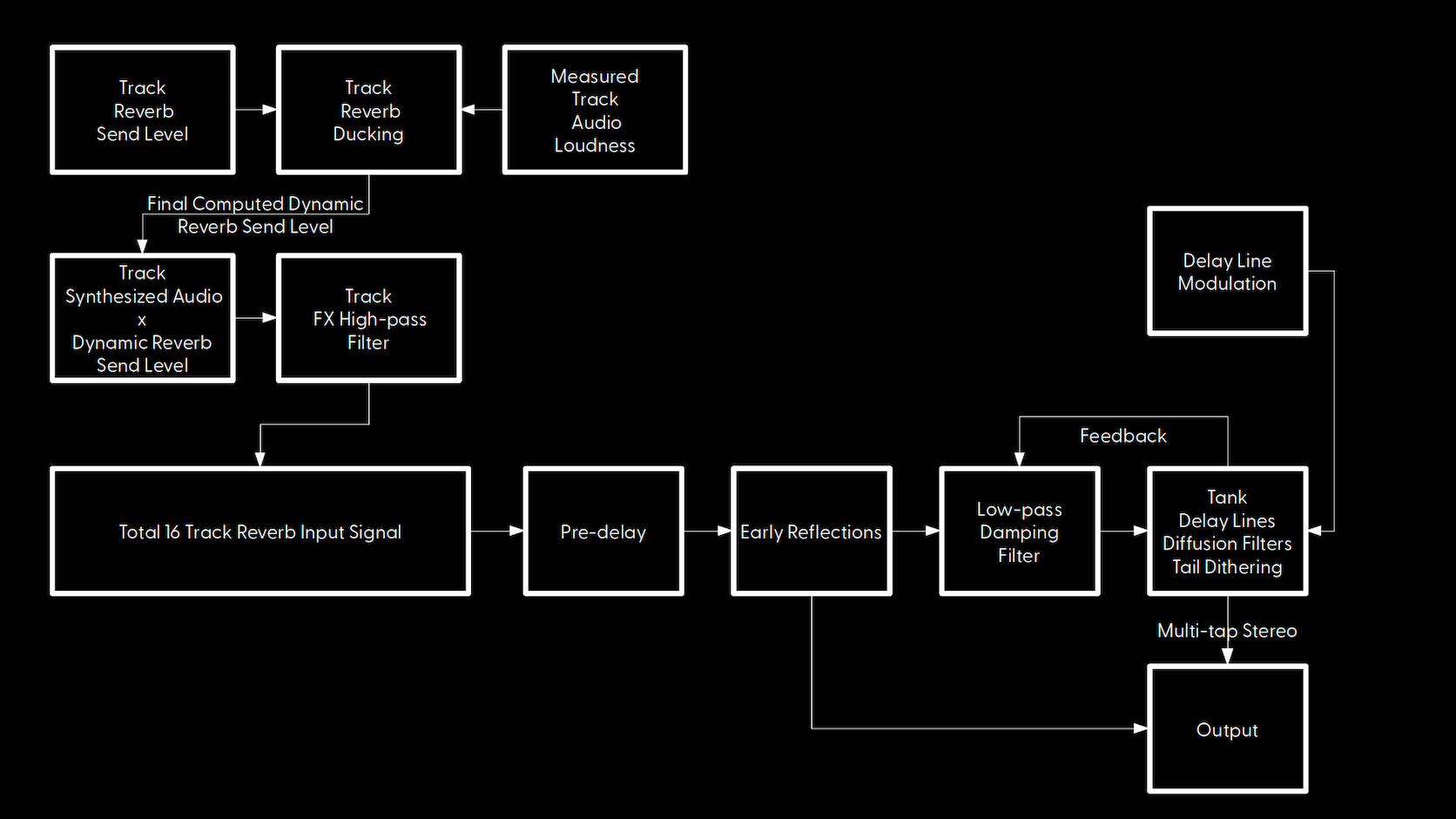
Your Woovebox comes with a versatile, high quality reverb effect, with special attention to fitting well in a finished mix.
It provides a lush sound with controllable feedback, pre-delay, damping and modulation ("haze"), plus early reflection simulation and tail noise shaping, without metallic artifacts or obvious repeats in tails.
In this reverb design, feedback (13/A5/rv.Fb) primarily controls how large the space is that is being simulated from 0 (tiny) to 127 (huge).
Damping (14/A6/rv.dM) controls how full or empty the space is with absorbers (for example carpet, curtains). It simulates how real rooms and spaces "eat" high frequencies. A "pass" value will not absorb any high frequencies and sound almost shimmery and ethereal. Settings other than "pass", show the frequency above which high frequencies are attenuated ("absorbed").
Pre-delay (15/A7/rv.P.d) ensures a sound sent to the reverb has some time (specified in milliseconds) to play its attack transient before its reverb counterpart kicks in. This allows sounds to punch through in the mix before they - potentially - get lost in their own reverb.
Finally, modulation (16/A8/rv.Md) specifies an optional modulation/turbulence depth for the delay lines to simulate atmospheric phenomenon such as air temperature, humidity and moving air. Higher value can convey the (imaginary) sound and shimmer of "heat haze".
Local and global reverb ducking
Per-track, the final reverb send level for the track may be dynamically reduced/"ducked" (14/A6/rv.dU on a track's dyna page) based on the track's output volume. This ensures a sound playing on a track is not drowned out by its own reverb. Its reverb tail only becomes progressively audible once the track itself stops playing a sound.
Per-track, the total global reverb signal may also be influenced in the same manner by a global ducking setting (13/A5/Gb.du on a track's dyna page). This is useful if you need to make sure a track's sound is not lost/drowned out by the effects (such as reverb). Note that this setting also affects delay 1. For example, this is useful when you need to make sure a kick is audible when an - otherwise - overwhelming reverb is sounding at the same time.
Both local and global ducking use the per-track compessor's attack (11/A3/CM.At on a track's dyna page) and release (12/A4/CM.rL on a track's dyna page) times.
High-pass filter before send FX
To avoid low frequency build-up ("mud") in the reverb tail, you can use the high-pass filter under 7/hh/EF.HP on the Pan & EQ ("PnEq") page. This setting filters low frequencies out a track's audio, before sending it to the reverb and delay effects.
Chorus
The chorus unit on your Woovebox allows for thickening up a sound, or even add an "overflying fighter jet"-like quality to a sound.
9/A1/Ch.SP controls the speed with which the chorus bounces between 10/A2/Ch.t1 chorus time1 and 11/A3/Ch.t2 chorus time 2.
There are two modes for the chorus slectable via 12/A4/Ch.AL; a Juno-like stereo chorus that thickens the sound, or a "phaser"-like sound (comb filter) that subtracts a time-offset version of the original signal.