
- How to determine a good color balance
- OSC (One-Shot-Color) instruments
OSC (One-Shot-Color) instruments
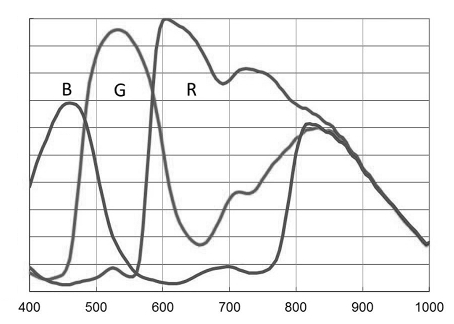
Many modern OSC cameras have a spectrum response that increases in sensitivity across all channels beyond the visual spectrum red cut-off (the human eye can detect red wavelengths up until around 700nm). This is a feature that allows these cameras pick up detail beyond the visual spectrum (for example for use with narrowband filters or for recording infrared detail).
However, imaging with these instruments without a suitable IR/UV filter (also known as a "luminance filter") in place, will cause these extra-visual spectrum wavelengths to accumulate in the visual spectrum channels. This can significantly impact the "correct" (in terms of visual spectrum) colouring of your image. Just as a light pollution filter makes it fundamentally impossible to white-balance back the missing signal, so too does imaging with extended spectrum response make it impossible to white-balance the superfluous signal away.
Hallmarks of datasets that have been acquired with such instruments, without a suitable IR/UV filter in place, is a distinct yellow cast that is hard (impossible) to get rid of, due to a strong green response coming back in combined with extended red channel tail.
The solution is to image with a suitable IR/UV filter in place that cuts-off the extended spectrum response before those channels increase in sensitivity again. The needed IR/UV filter will vary per OSC. Consult the respective manufacturers' spectral graphs to find the correct match for your OSC.
You may also be interested in...
- Narrowband accents (under Usage)
Adding narrowband accents to visual spectrum datasets has traditionally been a daunting, difficult and laborious process, involving multiple workflows.
- Color retention (under Usage)
The two aspects - colour and luminance - of your image are neatly separated thanks to StarTools' signal evolution Tracking engine.
- Compose: Effortless, Signal Evolution-Tracked Complex Composite Processing (under Features & Documentation)
Through the Compose module, StarTools is able to process luminance, color and narrowband accent information separately, yet simultaneously.
- On synthetic luminance generation (under Usage)
Any narrowband accent data loaded, does not impact synthetic luminance generation.
- Channel assignment and coloring and narrowband datasets (under Usage)
In practice this means that; When using visual spectrum datasets, load red into the red channel, green into the green channel, and blue into the blue channel.