
- Quick Start
- Workflows
Workflows
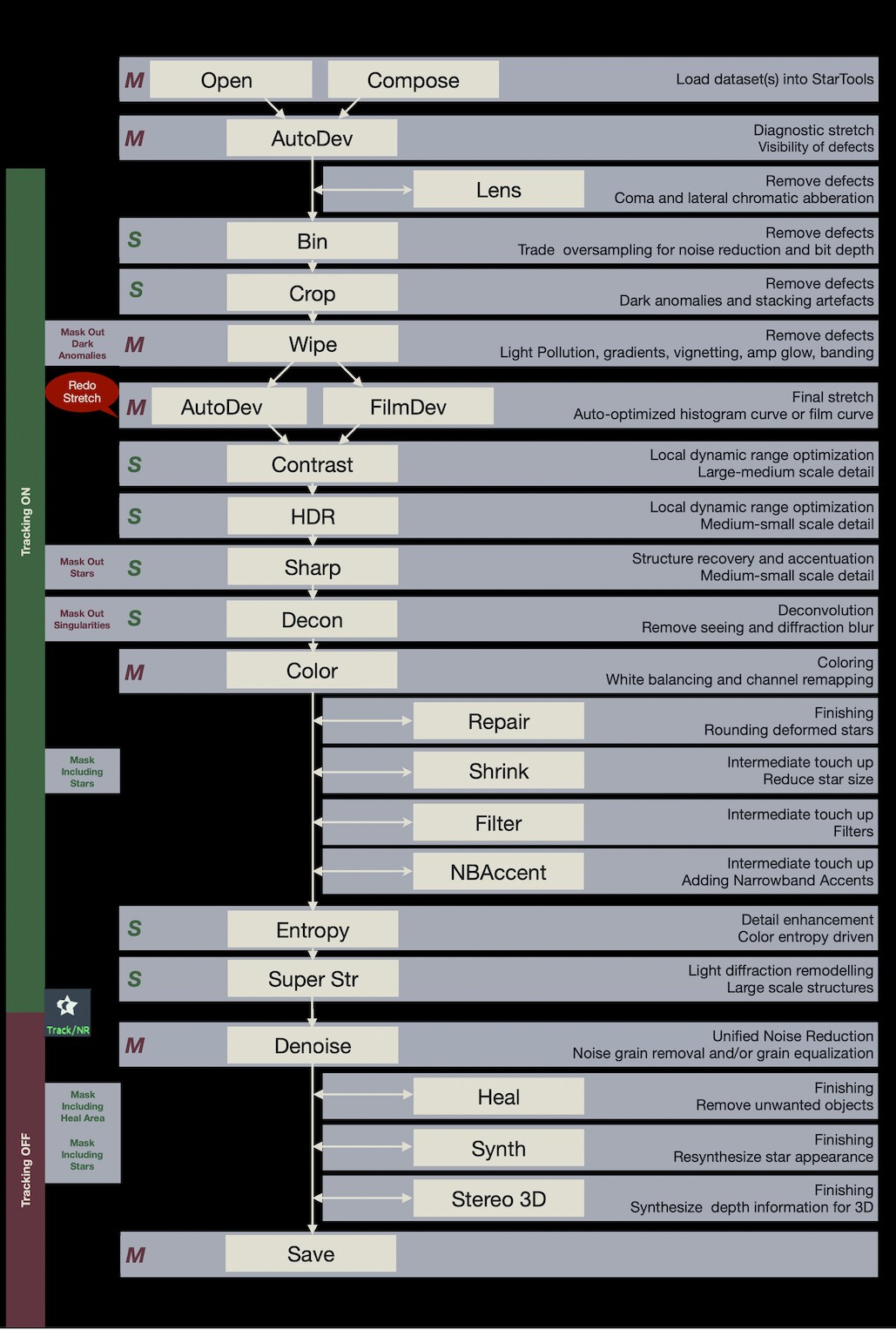
With a suitable dataset, workflows in StarTools are simple, replicable and short. Most modules are visited only once, with a clear purpose.
If you are familiar with other processing applications, you may be surprised with the seemingly erroneous mixing of modules that operate on linear vs non-linear data.
In StarTools, this important distinction is abstracted away, thanks to the signal evolution Tracking engine. In fact, it lets you do things, with ease, that are hard or impossible in other applications.
You may also be interested in...
- F. M., Belgium (under Testimonials)
- Step 1: Import, start Tracking (under Quick Start)
Open an image stack ("dataset"), fresh from a stacker.
- Step 3 (under Quick Start)
Bin the image up until each pixel describes one unit of real detail.
- Recovering PSF samples from the log (under Usage)
Any samples you set, are stored in the StarTools.log file and can be restored using the 'LoadPSFs' button.
- Compose: Effortless, Signal Evolution-Tracked Complex Composite Processing (under Features & Documentation)
Through the Compose module, StarTools is able to process luminance, color and narrowband accent information separately, yet simultaneously.